
Shake a Snack for iPhone® & iPod® touch


‘Top Shape-Up Apps’ by Health Magazine
‘8 Great Diet & Fitness Apps’ by CNN.com
‘8 Great Diet & Fitness Apps’ by CNN.com
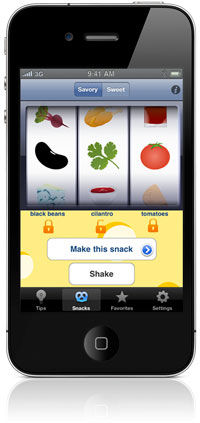
Discover and prepare healthy snacks with Shake a Snack! Shake your iPhone or iPod touch to watch the ingredients whiz by and land on one of over 300 snack recipes. Choose from sweet or savory snacks. Lock in ingredients you have on hand for easy snack ideas. You can even filter out ingredients you don’t like, or choose to view only vegetarian or vegan recipes. Save your favorite sweet and savory snack recipes for quick reference.
Healthy snacking has never been more fun! Get shakin’ with Shake a Snack app for $.99 on App Store and iTunes.
Healthy snacking has never been more fun! Get shakin’ with Shake a Snack app for $.99 on App Store and iTunes.
How-to: Details on Using the App
Shake a Snack recipes are meant to be simple and most are even portable. All you need is a cooler with ice packs and you can take satisfying snacks and mini-meals with you in your car. Beat the urge to hit the drive-thru or eat packaged and overly processed food with healthy snack ideas from Shake a Snack!
Recipes
To display ingredients by name in the spinners, turn shaker images off in the ‘Settings’ tab. Or, for the ultimate food ‘slot machine’, keep images on. Don’t like certain foods? You can remove ingredients by touching ‘Choose ingredients’ in the ‘Settings’ tab so they will not show up when you look for recipes.
Ingredients
To display ingredients by name in the spinners, select ‘Text’ above the shaker. Or, for the ultimate food ‘slot machine’, choose ‘Images. ‘ Don’t like certain foods? You can uncheck any ingredients in the ‘Settings’ tab so they will not show up when you look for recipes. Choose ‘Vegetarian’ and ‘Vegan’ filters in the ‘Settings’ tab to view only ingredients and recipes matching your food choices. Please note these filters override individual ingredient selections. For example, if you use the ‘Vegan’ setting, and individually select egg or beef, these ingredients will not display ince they are not vegan.
Favorites
Save your favorite snacks by touching the star icon on the upper right hand corner of the any recipe page. Remove any favorite by swiping across the recipe listing in the ‘Favorites’ tab and touching the ‘Delete’ button.
Tips
View tips for eating on the go, storing food, saving cooking time and eating healthy in the ‘Tips’ tab.
Submit Your Snack Ideas
Submit a Snack! We’re excited to hear about your unique snack creations. Suggest your snack ideas in the Submit tab and they may be added to Shake a Snack in the future. Get shakin’!
Shake a Snack Demo
Reviews
Shake a Snack Featured on OneMinuteNews.com
Use the Shake a Snack App for Snack Healthy Recipes
Shake a Snack Review on 148apps.com
Top Shape-Up Apps, Health Magazine
New App Adds Spice to Your Snacks
Get Healthy and Appy (by Lisa Cain, Ph.D. – writes about healthy snacks on Snack-Girl.com)